Kubernetes Networking Series: CNI
Jun 10, 2024 | 13 分钟
Overview
CNI (Container Network Interface) solves a boundary problem: when a container runtime needs to attach a container, or a Pod sandbox in Kubernetes, to a network, how should the runtime and the network plugin pass configuration, initiate the call, and return the result?
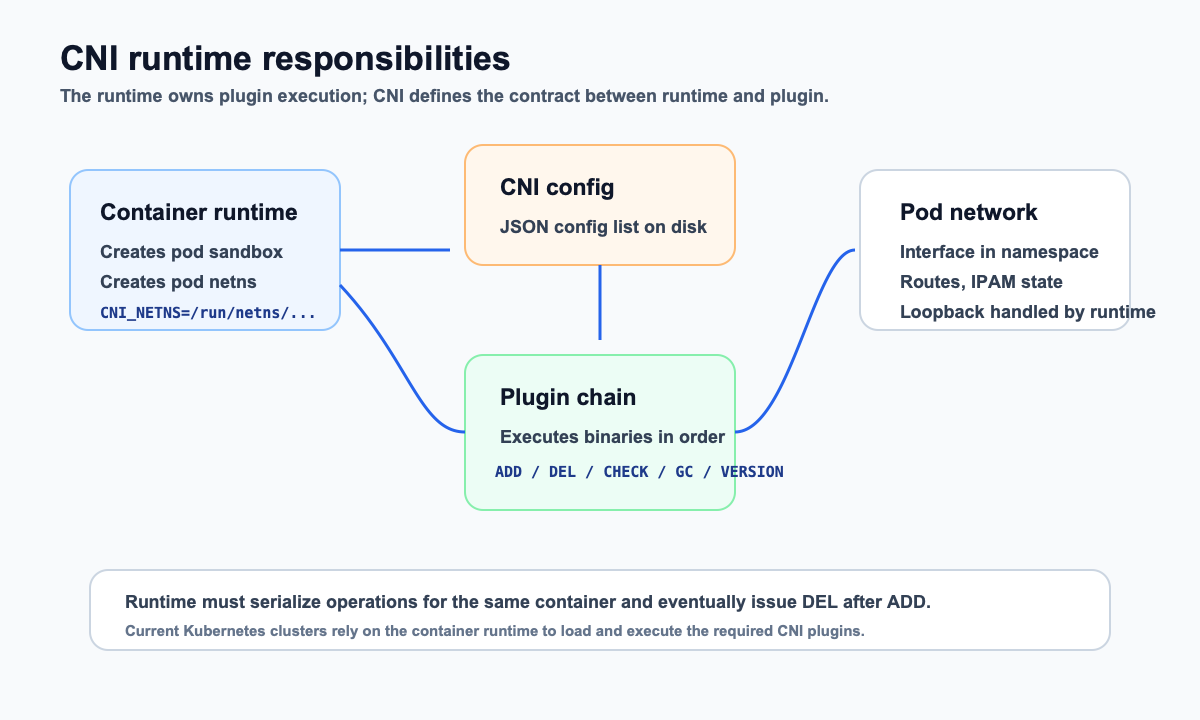
CNI is not a Kubernetes-only interface, nor is it a specific networking solution. The CNI specification cares about one thing: how a runtime calls a plugin. The runtime prepares the container’s network isolation domain, reads network configuration, and executes plugins in order. The plugin creates or adjusts network resources according to that configuration and returns the result to the runtime.
From this perspective, CNI is an adaptation layer in the container networking ecosystem. Kubernetes, containerd, CRI-O, and other runtime components do not need to build in every possible network implementation. Flannel, Calico, Cilium, and custom plugins also do not need a separate integration for every runtime. As long as both sides follow the CNI specification, they can cooperate in the same call chain.
Why CNI Is Needed
Start with single-node container networking. Containers usually run inside independent network namespaces. On the host side, veth pairs, bridges, routes, or NAT connect containers to the host network.
| Figure 1: In single-node container networking, containers connect to a host-side bridge through veth pairs |
|---|
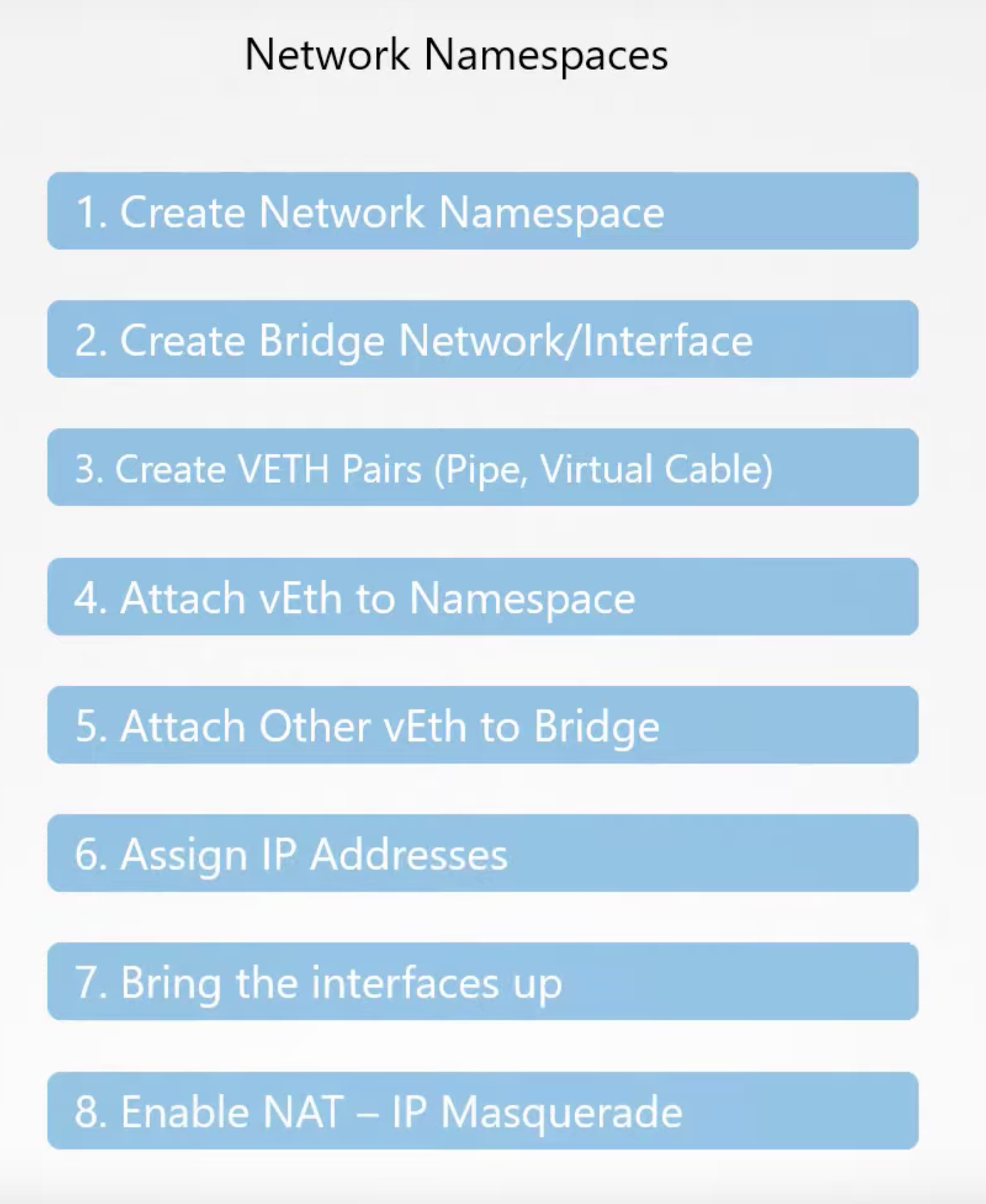 |
If we only look at a single machine, the network setup is not complicated: create a network namespace, create a veth pair, move one end into the container namespace, configure IP addresses and routes, and, when needed, configure NAT, forwarding, and firewall rules.
The problem is that these steps should not be hardcoded into every container runtime. Different users may need bridge, macvlan, ipvlan, overlay, BGP, cloud-provider VPC networking, or a full solution with network policy, encryption, and observability. If the runtime is tightly coupled to the networking implementation, the container networking ecosystem becomes difficult to extend.
The problem becomes more obvious once traffic crosses hosts. Pod IPs on different nodes need to reach each other. Nodes need to know which PodCIDR belongs to which node. The underlying forwarding may rely on Layer 3 routing, VXLAN, BGP, or cloud networking capabilities.
| Figure 2: Cross-node container communication requires Pod networks to be reachable across nodes |
|---|
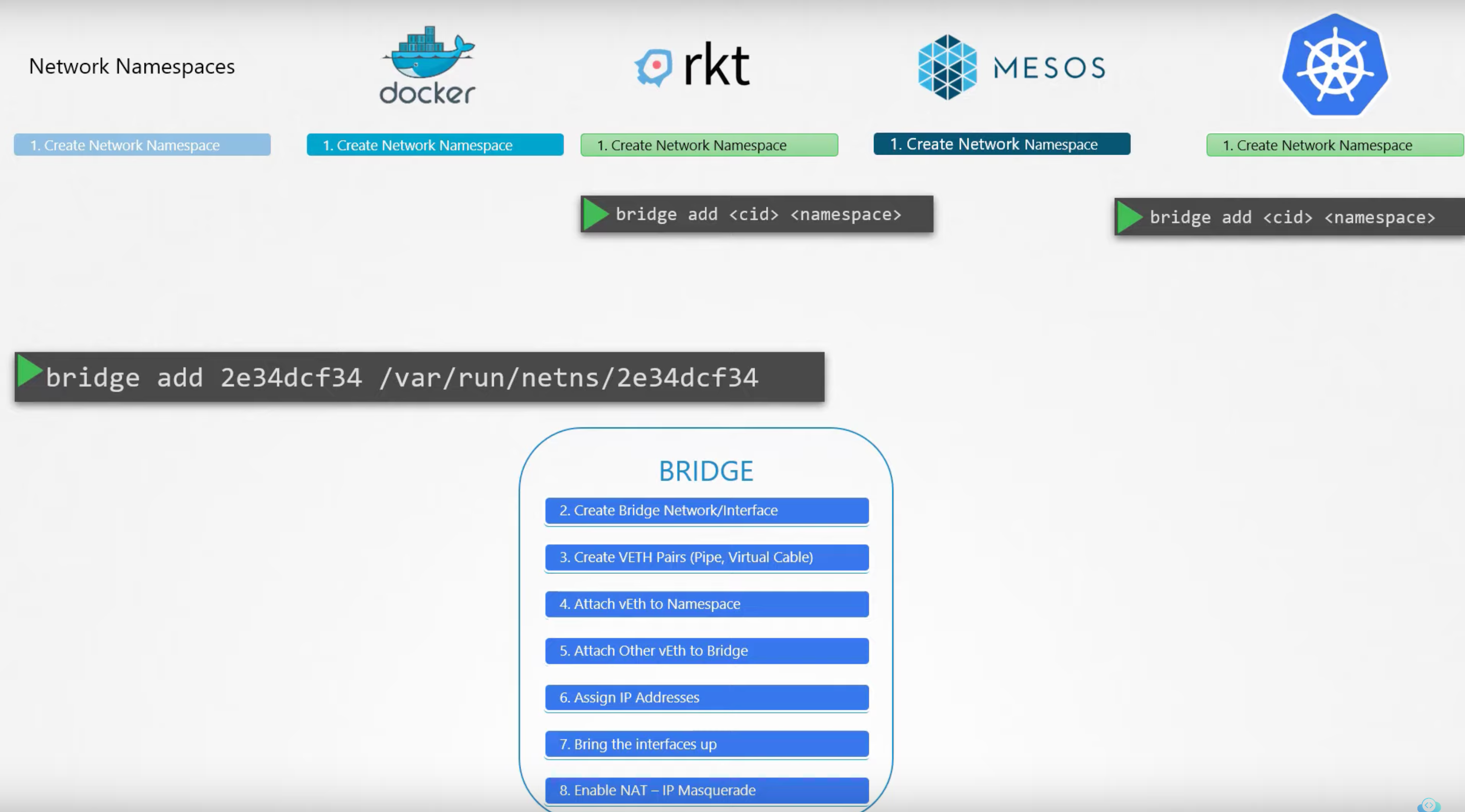 |
This is where CNI is valuable: it does not decide how the underlying network should be implemented. Instead, it standardizes the act of a runtime calling a network plugin. The runtime only needs to know how to load configuration, execute plugins, and handle results. Whether the network is bridge, VXLAN, BGP, or a cloud network is left to the plugin implementation.
What the CNI Specification Defines
The current CNI specification is 1.1.0. It defines four core terms:
container: a network isolation domain, such as a Linux network namespace, or another isolation unit such as a virtual machine.network: a group of endpoints that can communicate with each other and have unique addresses.runtime: the program responsible for executing CNI plugins.plugin: the program that performs the actual network operations according to the given network configuration.
The CNI specification mainly defines five things:
- Network configuration format: how an administrator or runtime describes a network.
- Execution protocol: how the runtime passes a request to a plugin.
- Execution order: how the runtime executes one or more plugins according to the configuration.
- Plugin delegation: how one plugin delegates part of its work to another plugin.
- Result types: how a plugin returns success or failure to the runtime.
| Figure 3: Responsibilities on the CNI runtime side |
|---|
 |
One point is easy to mix up: CNI does not define the Kubernetes networking model, and it does not require every plugin to implement overlay networking, routing, or network policy. CNI only defines the interface between runtime and plugin. Kubernetes has requirements at another layer: the CNI plugin installed on each node must implement the Kubernetes network model, such as allowing Pods to communicate with each other without NAT.
What a CNI Configuration File Looks Like
CNI configuration is JSON. The specification does not require configuration to come from disk, but on Kubernetes nodes the common convention is that the runtime reads configuration from /etc/cni/net.d and finds plugin binaries under /opt/cni/bin. The exact paths still depend on the container runtime configuration.
Modern configurations usually use a configuration list, which means a plugins array. The runtime executes plugins in array order, and the result from the previous plugin can be passed to the next plugin as prevResult.
A simplified configuration might look like this:
{"cniVersion": "1.1.0","name": "demo-net","plugins": [{"type": "bridge","bridge": "cni0","isDefaultGateway": true,"ipMasq": true,"ipam": {"type": "host-local","ranges": [[{"subnet": "10.10.0.0/16","gateway": "10.10.0.1"}]],"routes": [{"dst": "0.0.0.0/0"}]}},{"type": "portmap","capabilities": {"portMappings": true}}]}
In this example, bridge is the main plugin. It creates or uses a host-side bridge and attaches the container interface to it. host-local is the IPAM plugin, responsible for allocating IP addresses from a local address pool. portmap is a chained plugin used to handle port mapping features such as Kubernetes hostPort.
The type field in the configuration corresponds to the plugin binary name. For example, type: "bridge" means the runtime will look for an executable file named bridge in the CNI binary path. Plugin-specific fields are passed through to the plugin as-is, so different plugins can extend their own configuration fields.
How the Runtime Calls Plugins
The CNI execution protocol is intentionally simple: a plugin is an executable file. The runtime passes call parameters through environment variables and sends JSON configuration through stdin. On success, the plugin writes a JSON result to stdout. On failure, it exits with a non-zero exit code and returns an error result.
| Figure 4: Binary interface contract for CNI plugins |
|---|
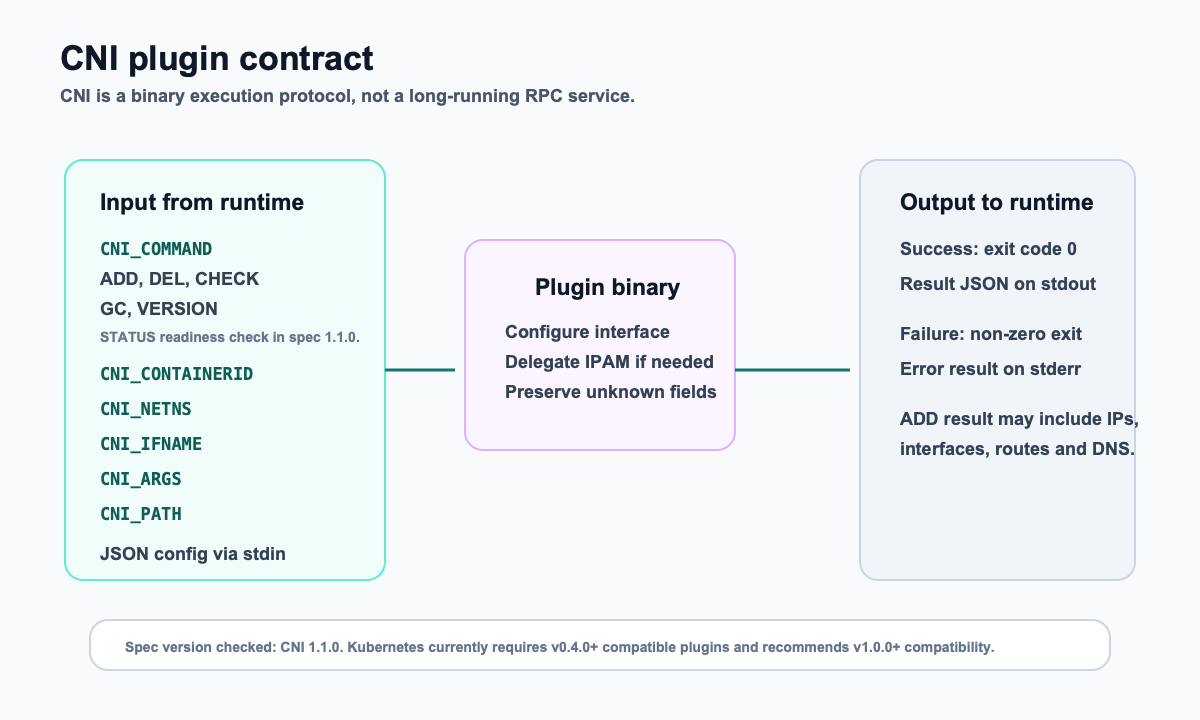 |
Common environment variables include:
| Environment Variable | Purpose |
|---|---|
CNI_COMMAND |
The operation for this call. Common values include ADD, DEL, CHECK, VERSION, and GC; the 1.1.0 specification also documents STATUS |
CNI_CONTAINERID |
The container or sandbox ID assigned by the runtime |
CNI_NETNS |
A reference to the container’s network isolation domain; on Linux this is usually a network namespace path |
CNI_IFNAME |
The interface name to create or configure inside the container, such as eth0 |
CNI_ARGS |
Additional key-value parameters |
CNI_PATH |
The list of paths where the runtime looks for plugin binaries |
From a lifecycle perspective, the most important calls are:
ADD: add the container to the network, create interfaces, configure IP addresses, routes, and rules.DEL: remove the container from the network and clean up resources created byADD.CHECK: check whether the existing network configuration still matches expectations.VERSION: query the CNI spec versions supported by the plugin.GC: clean up invalid network resources.STATUS: check whether the plugin itself or its external dependencies are available.
DEL should be as idempotent as possible. In real systems, container creation can fail, runtimes can retry, and nodes can reboot. A plugin cannot assume that every DEL corresponds to a fully successful ADD. Mature plugins usually spend a lot of effort on state records, locks, and cleanup after partial failures.
How Plugin Chaining and IPAM Work Together
CNI plugins can roughly be divided into two categories:
- Interface plugins: create or configure container network interfaces, such as
bridge,macvlan,ipvlan, andptp. - Chained plugins: continue adjusting configuration based on an existing result, such as
portmap,bandwidth, andtuning.
IPAM (IP Address Management) usually does not appear as a separate chained plugin in the plugins array. Instead, it is delegated by the main plugin through the ipam field. Taking bridge + host-local as an example, the common flow is:
- The runtime calls the
bridgeplugin. - The
bridgeplugin creates a veth pair and moves the container-side interface into the target network namespace. - The
bridgeplugin callshost-localIPAM to allocate an IP address, gateway, and routes for the container. - The
bridgeplugin configures the container interface and the host-side bridge according to the IPAM result. - The runtime passes the result to subsequent chained plugins, such as
portmap.
The official bridge plugin connects containers on the same host to a bridge in the host network namespace. The container receives one end of a veth pair, and the other end is attached to the bridge. If the bridge does not exist, the plugin creates it on first use. The bridge can also be configured as the container’s gateway.
The boundary of host-local IPAM is also important: it allocates IPv4 or IPv6 addresses from a configured address range and stores state on the local filesystem. Therefore, it only guarantees address uniqueness on a single host. Cross-node PodCIDR allocation, node route advertisement, or overlay encapsulation are not solved by host-local itself. Those responsibilities belong to higher-level components such as Flannel, Calico, Cilium, or cloud networking solutions.
CNI Boundaries in Kubernetes
In Kubernetes, after a Pod is scheduled onto a node, kubelet uses CRI to ask the container runtime to create a Pod sandbox. The network setup for the Pod sandbox is completed on the container runtime side by loading CNI configuration and executing CNI plugins.
| Figure 5: CNI call boundary after Kubernetes 1.24 |
|---|
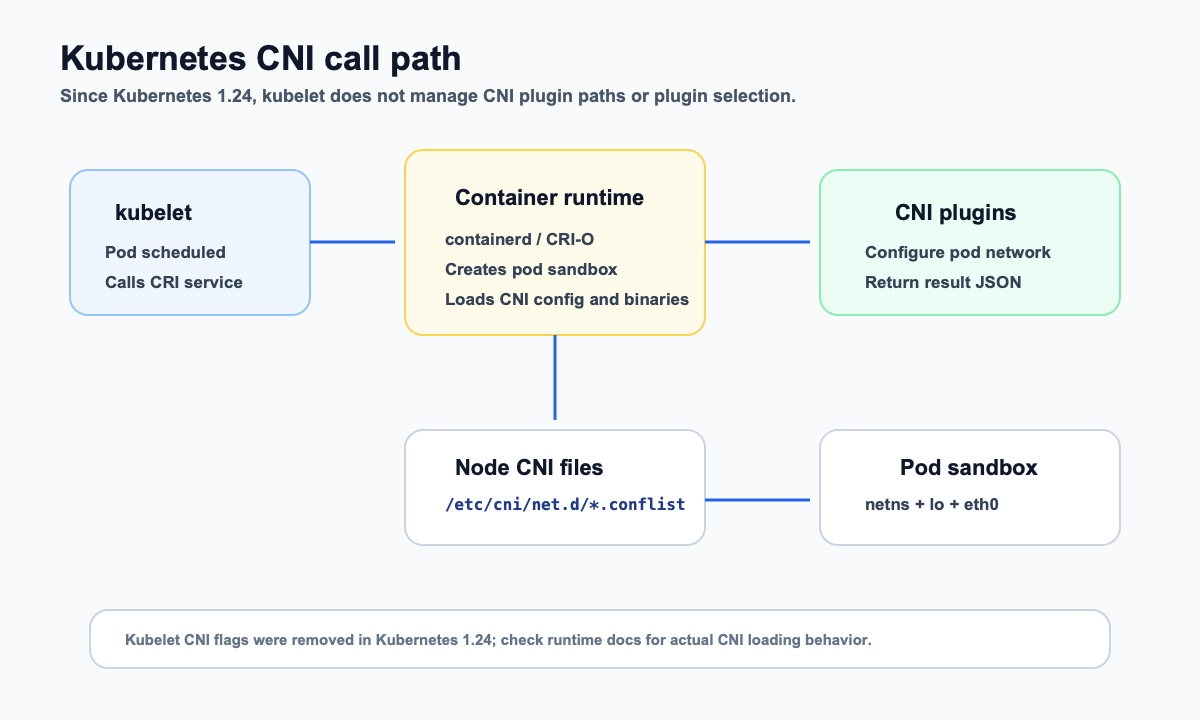 |
This boundary is especially important after Kubernetes 1.24. Older kubelet versions could participate in CNI management through flags such as cni-bin-dir and network-plugin. These flags were removed in Kubernetes 1.24, and CNI management is no longer in kubelet’s scope. To understand how a node loads CNI configuration today, you should look at the configuration of container runtimes such as containerd or CRI-O, rather than continuing to search for old kubelet flags.
Kubernetes documentation currently requires network plugins to be compatible with CNI spec v0.4.0 or later, and recommends plugins compatible with v1.0.0. There are two other requirements that are easy to miss:
- Every sandbox needs a loopback interface
lo; the runtime may reuse the CNI loopback plugin or implement equivalent functionality itself. - To support Pod
hostPort, the CNI chain usually needs theportmapplugin, with theportMappingscapability declared in the configuration.
So Kubernetes does not directly call some flannel, calico, or cilium function. Through kubelet and CRI, it delegates “create sandbox” to the container runtime. The runtime then executes the plugin chain according to the CNI configuration on the node.
Flannel as an Example
Flannel is a good introductory CNI example because it separates responsibilities fairly clearly:
flanneldruns on every node and retrieves cluster network and node subnet information from Kubernetes.- The Flannel manifest installs the
flannelCNI binary to/opt/cni/bin/flannel. - An init container in the manifest writes the CNI configuration to
/etc/cni/net.d/10-flannel.conflist. - The current default configuration uses the
flannelplugin, followed by theportmapplugin to supporthostPort. - The default backend can still be VXLAN, which is determined by Flannel’s
net-conf.json.
| Figure 6: The CNI chain in the current Flannel manifest |
|---|
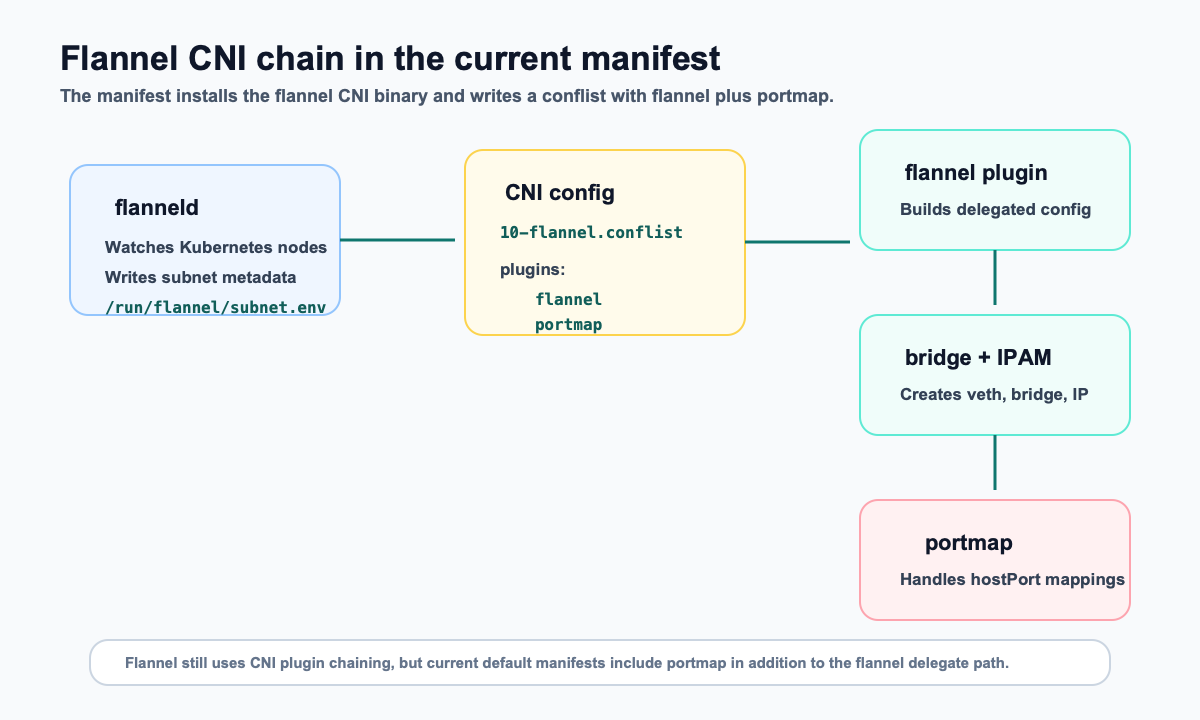 |
The common statement in older articles, “flannel -> bridge -> host-local,” can help explain the delegation chain, but it should not be treated as a complete description of the current manifest. A more accurate way to put it is:
- Flannel still integrates with container runtimes through the CNI plugin chain.
- The current manifest’s CNI chain explicitly includes
flannelandportmap. - Pod IP allocation is usually completed by a delegated IPAM plugin, so we should not loosely say that “the Flannel plugin itself completes all Pod IP allocation.”
- Flannel’s cross-node connectivity comes from subnet information maintained by
flanneldand from the backend networking capability, not from the CNI spec itself.
This also shows CNI’s boundary: CNI attaches the Pod sandbox to the network. How nodes communicate with each other is the responsibility of the concrete networking solution.
What It Takes to Write a Minimal CNI Plugin
When implementing a minimal CNI plugin, do not rush into overlay networking or network policy. The smallest closed loop is to understand the runtime call, handle lifecycle commands, and return a result that follows the specification.
A very small skeleton looks roughly like this:
func main() {cmd := os.Getenv("CNI_COMMAND")netns := os.Getenv("CNI_NETNS")ifName := os.Getenv("CNI_IFNAME")conf, err := io.ReadAll(os.Stdin)if err != nil {exitWithCNIError(err)}switch cmd {case "ADD":result := addNetwork(netns, ifName, conf)printResult(result)case "DEL":delNetwork(netns, ifName, conf)case "CHECK":checkNetwork(netns, ifName, conf)case "VERSION":printSupportedVersions()default:exitWithUnsupportedCommand(cmd)}}
A real plugin needs much more:
- Namespace operations: enter the target network namespace and configure interfaces.
- Link configuration: create veth devices, bridges, routes, neighbor entries, iptables or nftables rules.
- IPAM: allocate and release IP addresses, handle local state files and concurrency locks.
- Idempotency: handle repeated
DEL, cleanup after partial success, and runtime retries. - Version negotiation: correctly handle
cniVersion,VERSION, and result formats. - Plugin chaining: pass
prevResult, and clean up resources created by delegated plugins according to the specification when failures occur.
For learning, you can first run the official plugins, then write an experimental plugin that only handles ADD, DEL, and VERSION. Once it can be invoked through cnitool or an actual container runtime, you can gradually add CHECK, IPAM, and chained execution.
Common Troubleshooting Path
For CNI issues, do not start with the Kubernetes API immediately. First confirm whether the local runtime, configuration files, and plugin binaries on the node are consistent.
A common checking order is:
- Check CNI configuration: whether
/etc/cni/net.dcontains valid.conf,.conflist, or.jsonfiles. - Check plugin binaries: whether the
typeconfigured in CNI can be found in the runtime’s CNI binary path, commonly/opt/cni/bin. - Check container runtime configuration: whether containerd or CRI-O points to the correct CNI config directory and binary directory.
- Check runtime logs: when sandbox creation fails, the error usually appears in containerd, CRI-O, or kubelet logs.
- Check IPAM state: when using
host-local, IP allocation state is usually stored on the node’s local filesystem. - Check chained plugins: if
hostPortdoes not work, first check whetherportmapis in the chain and whether theportMappingscapability is enabled. - Check network namespaces and interfaces: confirm that veth devices, bridges, routes, iptables or nftables rules were actually created.
Some useful commands are:
ls -l /etc/cni/net.dls -l /opt/cni/bincrictl podsjournalctl -u containerd -u crio -u kubelet -n 200 --no-pager
If the error says failed to find plugin, check the binary path first. If it reports an IP allocation conflict, check IPAM state first. If the Pod is created successfully but cross-node traffic does not work, the focus is no longer just the CNI call itself; you need to inspect the routing, overlay, BGP, or cloud-network configuration of the specific networking solution.
Summary
To understand CNI, keep three threads in mind:
- CNI is the interface specification between runtime and plugin, not a concrete networking solution.
- The runtime reads configuration, prepares the network namespace, and executes the plugin chain; the plugin performs the actual network operations and returns a JSON result.
- After Kubernetes 1.24, the CNI management boundary is clearer: kubelet creates sandboxes through CRI, while CNI configuration and plugin loading mainly belong to the container runtime.
Using this boundary to look at Flannel, Calico, Cilium, or custom plugins is steadier than starting from old flowcharts. When troubleshooting, you can also move layer by layer in this order: runtime configuration -> CNI configuration -> plugin binary -> plugin chain -> concrete networking solution.