Overview
Recently, I ran into an issue while using AI. I had probably encountered it before, but I never paid much attention to it. Lately, because I’ve been doing some additional development on Agents myself, I started paying closer attention to how AI executes tasks, and that’s when I noticed the problem.
The issue started when Feishu recently open-sourced a client: https://github.com/larksuite/cli. I gave it a try, and it was indeed quite good. However, one problem is that it cannot send messages in a group chat on behalf of a user identity. The problem I ran into was that I asked AI to try sending a message to a group chat as me, and that’s when things went wrong. Below is part of the AI’s operation history:
- It tried to speak in the group as a user via
lark-cli: failed - It tried to speak in the group as a user via the API: failed
- It tried to speak in the group as a bot via
lark-cli: failed - It tried to speak in the group as a bot via the API: failed
- It wanted to keep trying other methods, and I stopped it
From the process above, one thing became clear in my interaction with Claude Code (Max Opus 4.6): it kept trying to achieve the goal I gave it, no matter what, like a tireless workhorse. But it had no obvious criterion for when it should stop. After looking into some materials, I found that in the Agent field this is called a “death loop.” It is a very common problem in Agents, but so far I still have not found a complete solution. So in this article, I want to talk about this issue and some of the more common ways people deal with it.
How Agents Work
Most AI Agents today use the ReAct (Reasoning + Acting) loop, which looks like this:
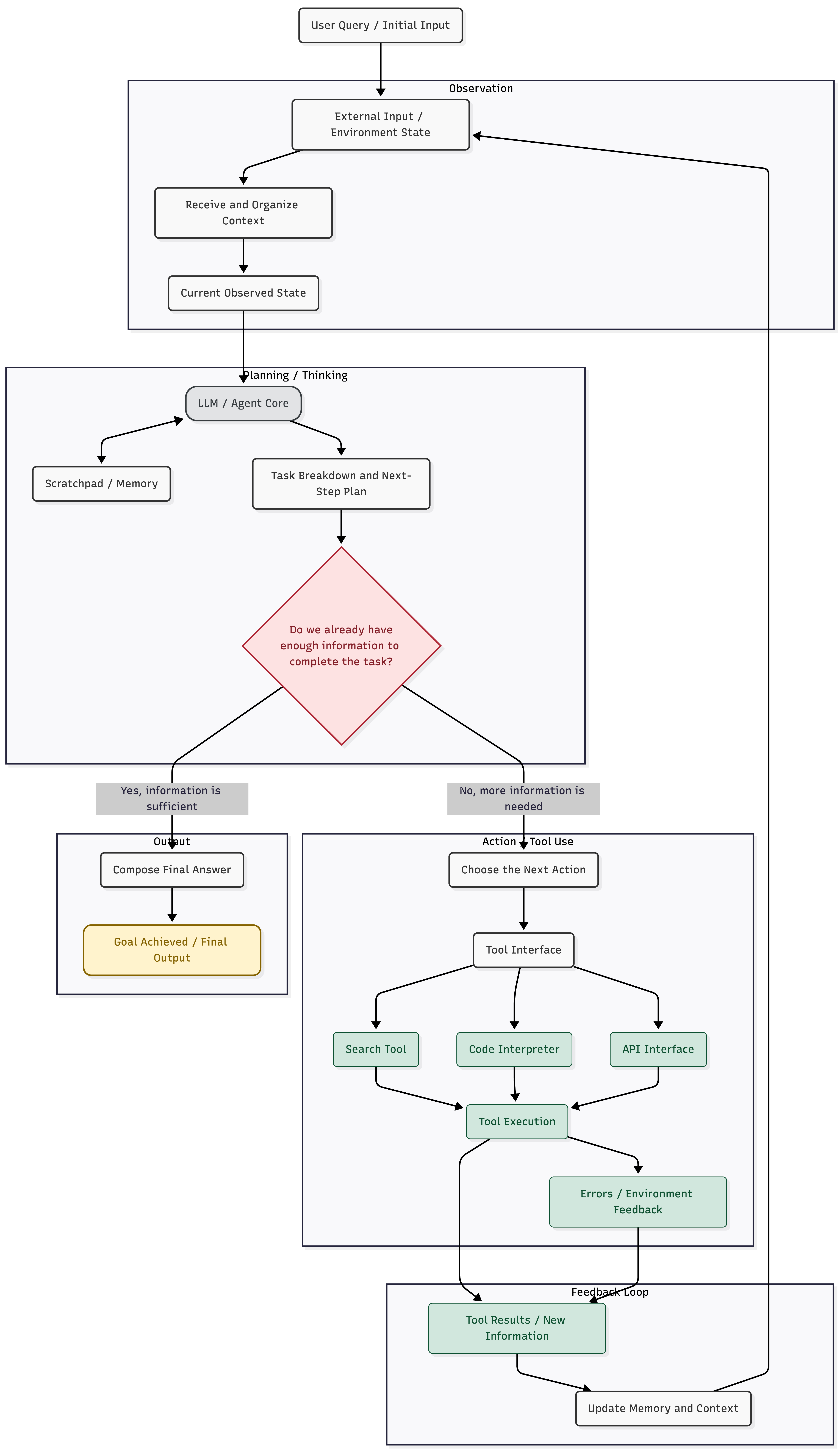
Although this diagram looks a bit complicated, it can actually be simplified into: Planning -> Action -> Observation. In other words, the large model produces a plan, then the Agent executes it. After execution, the model observes the resulting output to determine whether the goal has been achieved. If not, the model produces the next plan, and the Agent executes again, repeating the cycle until the model decides that the goal has been completed.
A Common Agent Failure: Death Loops
This naturally leads to a common problem: if the model keeps believing that the goal has not yet been achieved, it will continue planning the next step, and your Agent will continue executing it. The risk here is that the process may fall into some form of death loop. By “death loop,” I mean something like this:
- The model tells you to try operation A, and after execution, the result does not satisfy the condition.
- The model tells you to try operation B, and after execution, the result still does not satisfy the condition.
- The model then tells you to try operation A again, and after execution, the result still does not satisfy the condition.
And so the model keeps cycling between A and B.
Of course, this is only a simplified example. In real-world practice, the loop may not just be between A and B. It might loop among A, B, and C, or alternate in patterns like A, B, A, C, and then B, C. Another especially frustrating case is when it becomes obsessed with A. For example, a certain Skill may say that tool A can perform a certain task, so the operation is to run A-cli. The model then calls A-cli and tries it, but the result does not match expectations. At that point, the model starts calling A-cli --help to inspect the help options, then begins experimenting with different combinations based on that help output. This is also a very common problem.
How Do We Solve Death Loops?
What I want to discuss here is how to exit a death loop, not how to exit a loop in general. If the LLM is working well, it can simply tell us that the task has been completed and that there is no need to continue the Agent loop.
After studying some of the existing approaches people have shared, I found that the main solutions fall into the following categories.
1. Limit the Number of Loops
This is a very common and easy-to-implement approach. When you use many third-party SDKs to build Agents, this parameter is often available by default. Its meaning is simple: limit how many times the Agent is allowed to execute the Plan -> Act -> Observe loop. Once that number is exceeded, the process stops regardless of whether the LLM claims the goal has been reached.
But the problem with this approach is also obvious. For complex tasks, we often genuinely need more steps. If you set a fixed loop limit, the task may fail even when the intermediate steps are all reasonable. So this can only serve as a fallback strategy, not as the primary control mechanism.
2. Limit Tool Invocation Frequency
If limiting the total number of Agent loops feels too blunt, then we can limit how often the LLM is allowed to call specific tools. For example, as I mentioned earlier, if the model finds that directly following a Skill and executing a CLI tool does not produce the expected result, it may start calling the CLI’s help command to inspect other options and keep experimenting. After one failed attempt, the LLM may try again.
Based on this idea, we can impose a rule such as: if a tool is called more than a certain number of times within a certain number of loops, we stop the task. For example, if within 20 loops the model calls a particular tool 5 times, we terminate the loop.
This pattern is useful in many cases, but it can also be triggered incorrectly in some scenarios. For instance, if a Skill is poorly designed, it may produce false positives. Suppose you assign a deployment task, and the Skill says you can check whether deployment is complete with a certain CLI command. If the deployment takes a long time, then repeatedly checking deployment status may trigger this rule and cause the Agent to exit early. Of course, once you notice this issue, the solution is fairly straightforward: wrap the polling logic into a dedicated tool, and let that tool periodically check until deployment is complete before reporting back to the LLM.
Although this approach offers much more flexibility, it is still fundamentally rule-based. That leads to the next approach: using the LLM itself as the detector.
3. LLM-Based Detection
This may sound strange at first. If the death loop is caused by an LLM problem in the first place, how can an LLM be used to detect it?
To answer that, we need to go back to the role division within the Agent loop. In a typical Agent loop, there are several kinds of messages:
- Messages generated by the LLM, which we usually call
assistant messages - Information provided by the user, which we usually call
user messages - Information produced by tools, which we usually call
tool messages
Here, we focus on assistant messages. We can maintain a history of assistant messages and periodically use another LLM session to examine the sequence of those messages and judge whether the original LLM has entered a death loop. If it has, then we switch strategies or stop the task.
This approach gives us more flexible control, but because it introduces another LLM session, it also adds complexity. Even so, it may work better than relying solely on the first two approaches.
4. The Ultimate Move: Human Intervention
Of course, when the LLM starts acting foolishly, the most useful thing is still human intervention. But this introduces another problem: we need to know whether the Agent has actually fallen into a death loop.
In my own practice, when running an Agent loop, I do not read the full content of every message. Instead, I have the Agent summarize what it is doing at each step, and that is usually enough. By skimming the history, I can quickly tell whether the Agent is just spinning in circles. For example, here is one of my operation histories:
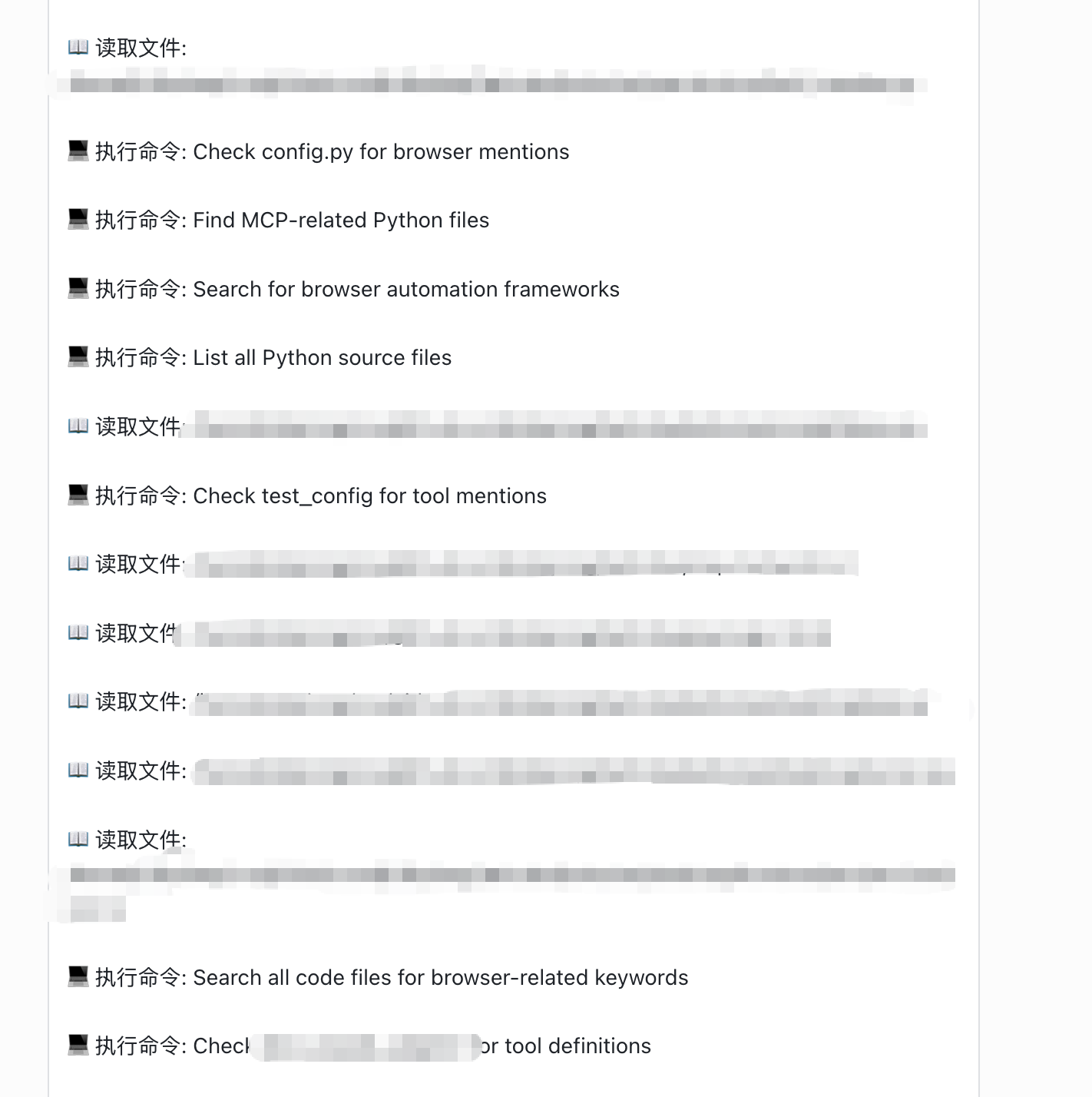
Once I notice that the Agent is no longer doing anything useful, a quick Ctrl + C usually brings it back into line.
Conclusion
In this article, I briefly introduced what death loops are in Agent development and usage, and I also shared some solutions based on my own understanding. That said, these are far from the only possible approaches. Agent development is still expanding rapidly, and new theories and practices are constantly emerging. If you have other solutions from your own experience, feel free to leave a comment and discuss them together.