Dapr Getting Started Guide
May 28, 2022 | 13 分钟
Overview
Dapr stands for Distributed Application Runtime. It can be understood as a runtime for distributed applications. It is not a regular SDK, and it is not Service Mesh. Instead, it exposes distributed capabilities such as service invocation, state management, publish/subscribe, external bindings, configuration, secrets, and workflow to applications through HTTP/gRPC APIs.
This article does not try to explain the full Dapr architecture. Instead, it focuses on practical getting-started questions:
- How to install and start Dapr in local self-hosted mode.
- What
dapr runactually starts. - What the default Redis, Zipkin, Placement, and Scheduler components do.
- How to use Dapr for service invocation, publish/subscribe, and state management.
- How to troubleshoot common problems when using Dapr for the first time.
If you only remember one sentence, you can understand Dapr like this:
The application talks only to its local Dapr sidecar, and the Dapr sidecar helps the application access services, state stores, messaging systems, and other external capabilities.
Dapr Core Concepts
When getting started with Dapr, the concepts that are easiest to confuse are app, sidecar, component, and building block.
app is your business application. It can be written in Go, Java, Python, Node.js, or any other language that can send HTTP/gRPC requests.
daprd is the Dapr runtime process. When you use dapr run to start an application, the Dapr CLI also starts a daprd sidecar. The business application accesses the sidecar through a local port, such as localhost:3500.
app-id is the application’s name inside the Dapr world. During service invocation, the caller does not directly write the target process address. Instead, it invokes the target application through its app-id.
building block is the capability abstraction exposed by Dapr, such as Service Invocation, State Management, Pub/Sub, Bindings, Actors, and Workflow.
component is the concrete implementation behind a building block. For example, State Management can use Redis, PostgreSQL, or MongoDB; Pub/Sub can use Redis Streams, Kafka, or RabbitMQ. The application calls Dapr APIs, and Dapr uses component configuration to access the underlying implementation.
So a typical Dapr call path looks like this:
Business code -> local Dapr sidecar -> Dapr component -> Redis/Kafka/other services.
Lab Environment
For local getting started, it is recommended to use Dapr’s self-hosted mode first. This means running the Dapr sidecar and default dependent components directly on your machine or VM, without relying on Kubernetes.
Recommended prerequisites:
- Linux or macOS.
- Docker, used to run default containers such as Redis, Zipkin, Placement, and Scheduler.
- Go, used to run the sample programs in this article.
- curl, used to call Dapr HTTP APIs directly.
If you are experimenting in a Linux VM created by libvirt, first make sure Docker is working:
docker versiondocker ps
If Docker is not running, dapr init may fail later, or the default components may not start correctly.
Install the Dapr CLI and Initialize the Runtime
On Linux, you can install the Dapr CLI with the official installation script:
wget -q https://raw.githubusercontent.com/dapr/cli/master/install/install.sh -O - | /bin/bash
On macOS, you can use Homebrew:
brew install dapr/tap/dapr-cli
After installation, check the CLI version:
dapr --version
Then initialize the local Dapr runtime:
dapr init
After initialization, you can inspect the default components created by Dapr:
docker ps --format 'table {{.Names}}\t{{.Image}}\t{{.Status}}'
You will usually see these containers:
dapr_redis: local Redis, which can be used as the default state store and pub/sub component.dapr_zipkin: local Zipkin, used for distributed tracing.dapr_placement: Actor placement service, used for Actor distribution and placement.dapr_scheduler: used for Jobs, Actor reminders, Workflow, and related scheduling scenarios.
Dapr also generates default component configuration locally, usually under ~/.dapr/components:
ls ~/.dapr/components
Common files include:
statestore.yaml: the default state store component.pubsub.yaml: the default publish/subscribe component.
These YAML files are important. The names used in Dapr APIs must match the component names. For example, later when saving state, we will use statestore; when publishing messages, we will use pubsub.
Runtime Status and Optional Dashboard
When getting started with Dapr, you need a way to observe runtime status. The most stable approach is to start with the CLI, metadata API, container status, and logs.
First, list the Dapr applications currently running on the machine:
dapr list
Then check whether the default component containers are healthy:
docker ps --format 'table {{.Names}}\t{{.Image}}\t{{.Status}}'
If your Dapr CLI version still provides the Dashboard command, you can use it to observe applications and components:
dapr dashboard -p 7777 -a 0.0.0.0
Then open it in your browser:
http://<your machine IP>:7777
If you only need local access, use:
http://localhost:7777
| <strong style="font-size: 16px">Figure: Dapr Dashboard</strong> |
|---|
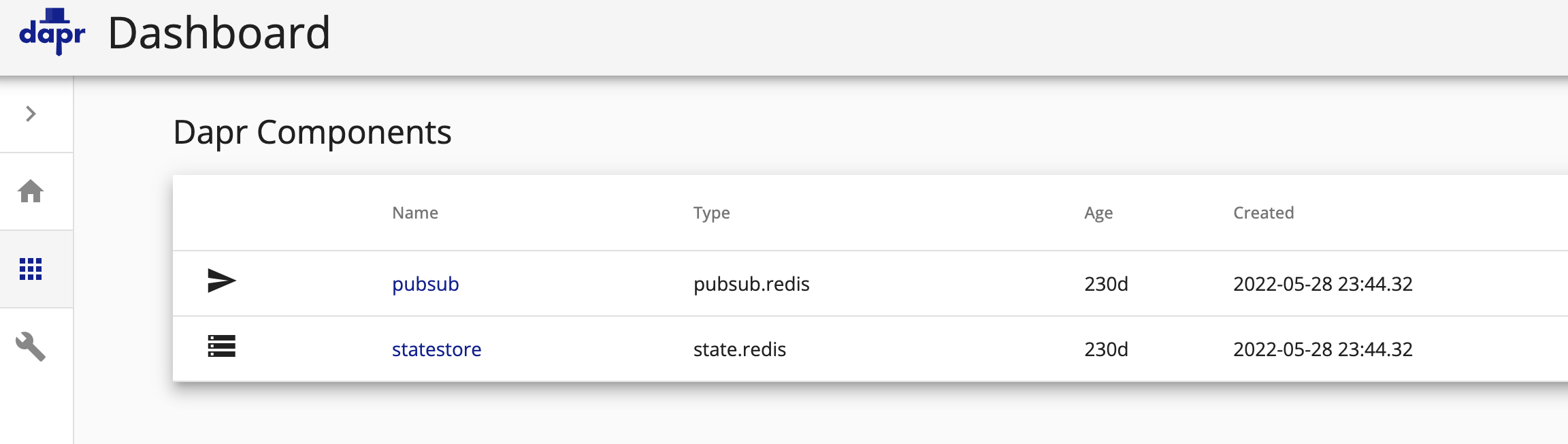 |
Note that Dashboard availability depends on the CLI version and deployment mode. It should not be treated as a hard dependency for this tutorial. For real troubleshooting, you should still inspect dapr run output, application logs, component configuration, metadata APIs, and container status. In Kubernetes environments, production-grade observability usually uses Prometheus, Grafana, and logging systems.
Understanding dapr run
dapr run is the most important command when getting started with Dapr. It does not only start the application. It starts both the business process and the Dapr sidecar.
A typical command looks like this:
dapr run \--app-id order-processor \--app-port 6001 \--app-protocol http \--dapr-http-port 3501 \-- go run ./cmd/httpserver/main.go
The key parameters are:
--app-id order-processor: gives the business application a Dapr-internal name.--app-port 6001: tells Dapr which port the business application listens on.--app-protocol http: tells Dapr that the business application uses HTTP.--dapr-http-port 3501: the HTTP port exposed by the Dapr sidecar.- The command after
--: the command that actually starts the business application.
After startup, the business application listens on 6001, and the Dapr sidecar listens on 3501. If another application wants to call it through Dapr, that application first calls its own local sidecar, and the sidecar then finds order-processor.
This is Dapr’s core experience: the business application does not directly handle service discovery, message component connections, or state component connection details. It calls standard APIs through the local sidecar.
Service Invocation Example
First, write an HTTP service that listens on /orders:
package mainimport ("fmt""io""log""net/http")func getOrder(w http.ResponseWriter, r *http.Request) {data, err := io.ReadAll(r.Body)if err != nil {http.Error(w, err.Error(), http.StatusBadRequest)return}fmt.Println("Order received:", string(data))_, _ = w.Write(data)}func main() {http.HandleFunc("/orders", getOrder)log.Fatal(http.ListenAndServe(":6001", nil))}
Start the server:
dapr run \--app-id order-processor \--app-port 6001 \--app-protocol http \--dapr-http-port 3501 \-- go run ./cmd/httpserver/main.go
Open another terminal and start the caller sidecar. The caller can have no business port, because it only initiates requests:
dapr run \--app-id checkout \--dapr-http-port 3500 \-- go run ./cmd/httpclient/main.go
If you just want to verify service invocation with curl first, you can call checkout’s local sidecar directly:
curl -X POST \http://localhost:3500/v1.0/invoke/order-processor/method/orders \-H 'Content-Type: application/json' \-d '{"orderId":"1001"}'
This URL means:
localhost:3500: the caller’s local Dapr sidecar./v1.0/invoke/.../method/...: the Dapr service invocation API.order-processor: the target application’s app-id.orders: the HTTP route exposed by the target application.
There are two boundaries to keep in mind for service invocation.
First, Dapr service invocation is an explicit API call. It is not transparent traffic interception like Service Mesh. Business code needs to actively call Dapr APIs or Dapr SDKs.
Second, in self-hosted mode, service discovery depends on the local runtime environment by default. If you call across VMs or subnets, or if mDNS is unstable, service discovery may fail. In production, it is usually better to run Dapr on Kubernetes, or configure a more explicit name resolution component for self-hosted mode.
Publish and Subscribe Example
Dapr Pub/Sub is used to decouple asynchronous communication between services. After default initialization, the local environment usually has a Redis Pub/Sub component named pubsub.
The subscriber needs to tell Dapr which pub/sub component it subscribes to, which topic it subscribes to, and which route messages should be delivered to. The most general approach is to implement the /dapr/subscribe endpoint.
A minimal HTTP subscriber can be written like this:
package mainimport ("fmt""io""log""net/http")func subscribe(w http.ResponseWriter, r *http.Request) {w.Header().Set("Content-Type", "application/json")_, _ = w.Write([]byte(`[{"pubsubname": "pubsub","topic": "orders","route": "orders"}]`))}func orders(w http.ResponseWriter, r *http.Request) {data, _ := io.ReadAll(r.Body)fmt.Println("pubsub event:", string(data))w.WriteHeader(http.StatusOK)}func main() {http.HandleFunc("/dapr/subscribe", subscribe)http.HandleFunc("/orders", orders)log.Fatal(http.ListenAndServe(":6002", nil))}
Start the subscriber:
dapr run \--app-id order-subscriber \--app-port 6002 \--app-protocol http \--dapr-http-port 3502 \-- go run ./cmd/subscriber/main.go
Publish a message:
curl -X POST \http://localhost:3502/v1.0/publish/pubsub/orders \-H 'Content-Type: application/json' \-d '{"orderId":"1001","status":"created"}'
Here, pubsub must match the component name, and orders is the topic name.
When getting started with Pub/Sub, pay special attention to delivery semantics. Dapr Pub/Sub usually provides at-least-once delivery. This means messages are not easily lost, but consumers must be able to handle duplicate messages. In real business systems, you need idempotency logic, such as deduplicating by order ID, event ID, or a business idempotency key.
State Management Example
Dapr State Management provides applications with a unified state read/write API. In the default local environment, Redis is usually used as the statestore.
First, start a sidecar that is only used to initiate API calls:
dapr run \--app-id state-client \--dapr-http-port 3500 \-- sleep 3600
Save state:
curl -X POST \http://localhost:3500/v1.0/state/statestore \-H 'Content-Type: application/json' \-d '[{"key": "order-1001","value": {"status": "created","amount": 99}}]'
Read state:
curl http://localhost:3500/v1.0/state/statestore/order-1001
Delete state:
curl -X DELETE http://localhost:3500/v1.0/state/statestore/order-1001
The key point of state management is not that Dapr sends a Redis command for you. It is that the application faces a unified API. If the state store later changes to PostgreSQL, MongoDB, or a cloud service, the application-side calling method can remain as stable as possible.
But there is still an important boundary: Dapr unifies the access method, not the semantics of all databases. Different state stores support transactions, queries, ETags, TTL, consistency, and other capabilities differently. It is fine to start with the default Redis component, but for real production use, you must check the capability matrix of the target state store.
Query and Transaction Boundaries
The original draft mentioned query by conditions, which is worth explaining separately.
Dapr State Query API allows applications to query state by conditions, such as filters, sorting, and pagination. But it is not a universal SQL layer supported by every state store. Query capability depends on the underlying component implementation, and different components support different subsets.
When using the State Query API, keep these points in mind:
- First confirm whether the target state store supports query.
- Do not treat it as a full SQL replacement across storage systems.
- For complex queries, reporting, analytics, or strong relational models, prefer the database capabilities designed for those use cases.
Transactions are similar. Dapr State Transaction only provides transaction capability inside a state store that supports transactions. It is not a global distributed transaction coordinator across services and databases.
If the business needs to handle cases such as “an event must be published after state is updated,” you can further look into Dapr Outbox. Outbox aims to reduce the risk of inconsistency between state changes and event publishing, but it also depends on the capabilities of the state store and pub/sub component. It is not a universal transaction solution.
Metadata and Troubleshooting
When getting started, it is useful to know several troubleshooting entry points.
View sidecar metadata:
curl http://localhost:3500/v1.0/metadata
List local Dapr applications:
dapr list
Stop an application:
dapr stop --app-id checkout
Common problems can be investigated as follows.
If dapr init fails, first check whether Docker is running and whether images can be pulled.
If service invocation returns 404, check whether the target application’s app-id is correct, whether the target HTTP route exists, and whether the target application has already been started with dapr run.
If Pub/Sub messages are not received, check whether the /dapr/subscribe response is correct, whether pubsubname matches the component name, and whether the subscriber logs show that subscription registration succeeded.
If the State API returns an error, check whether the statestore name matches the component name in ~/.dapr/components/statestore.yaml, and also check whether the Redis container is healthy.
If you are testing service invocation in a VM environment and cross-machine calls fail, do not immediately blame the business code. In self-hosted mode, service discovery is closely related to the network environment. First check port listening, firewall rules, mDNS/name resolution, and the virtual network mode.
When to Go Deeper into Dapr
After completing the experiments in this article, you should understand the basic way Dapr works:
- Use
dapr initto prepare the local runtime and default components. - Use
dapr runto start both the business application and the Dapr sidecar. - Use Service Invocation for service calls.
- Use Pub/Sub for asynchronous event communication.
- Use State Management for unified state reads and writes.
- Use Dashboard, metadata, logs, and component YAML to troubleshoot problems.
If you want to continue learning, you can go deeper in several directions:
- Kubernetes mode: understand the roles of Dapr sidecar injector, operator, sentry, placement, and scheduler in a cluster.
- Resiliency: learn how to configure timeout, retry, circuit breaker, and related policies.
- Secrets and Configuration: learn how applications read secrets and configuration from the runtime.
- Workflow and Outbox: learn how to handle complex business processes and consistency between state and events.
- Component selection: understand capability differences across state stores, pub/sub systems, and bindings.
The most important thing when getting started with Dapr is not memorizing every API. It is building a mental model: Dapr extracts distributed capabilities from business code and provides them to applications through sidecars and standard APIs. Once this model is clear, learning the other building blocks becomes much easier.